Today I hit an issue upgrading our database from 10.2.0.4 to 11.2.0.1.
The main metalink note which details the steps needed is: Interoperability Notes EBS R12 with Database 11gR2 [ID 1058763.1]
Step 22 involves implementing autoconfig in the new database home. However, when I ran $ORACLE_HOME/appsutil/bin/adconfig.sh it would fail
Checking the logfile I found that afdbprf.sh fails with ORA-12504: TNS:listener was not given the SERVICE_NAME in CONNECT_DATA
Metalink has an article which discusses the issue:
ORA-12504 When Using (HOSTNAME) Method For 11G Client/Database [ID 556996.1]
The note goes into a fair bit of detail about why this error is happening and how to resolve it. In a nutshell, 11g expects the service name to be specified in the connect string. If one isn’t specified then it uses the default service name specified at the listener level. If the listener is not configured with a default then an error is thrown:
ORA-12504: TNS:listener was not given the SERVICE_NAME in CONNECT_DATA
Previous to 11g, if you dídn’t specify the service name, then the connect string alias was used instead. In the case of the following connection string, VIS is the alias:
sqlplus apps/pass@VIS
The solution is to configure listener with a default service name using the DEFAULT_SERVICE_listener_name parameter. I added the following to my listener.ora ifile, reloaded the listener and re-ran adconfig.sh successfully. Note: if you add it directly to the listener.ora file and not the ifile, then the change will be lost when your run adconfig.sh.
DEFAULT_SERVICE_VIS=(VIS)
Since this is an EBS environment I always search to make sure there are no issues but I was surprised to find nothing. I’m wondering if I missed something in the upgrade steps. Have you upgraded to 11g? Did you hit this issue?
Thursday

SOA 11.1.1.2 CFGFWK-60814
I hit the following error trying to install SOA 11.1.1.2 on a Linux x86-64 environment. It seems a few people have hit this issue so I thought I would post the solution I found. Its not much of a "fix", but while researching the problem I noticed some questionable suggestions, including deleting files. Who knows, they may have opened an SR and thats what they were told to do. Regardless, here is what worked for me.
On the Select Domain Source screen:

I would get the following error when trying to select “Oracle SOA Suite”
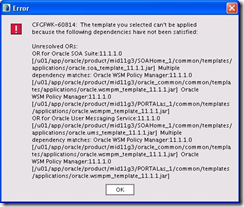
The solution I found, was just to select the products you want from the bottom up. So Oracle JRF first, Oracle WSM Policy Manager second, etc. By looking at error above you can see that there are multiple dependencies, one such being Oracle WSM Policy Manager. So if you select them first, you don't get the error.
If your using windows try running the config.cmd script as an Administrator.
On the Select Domain Source screen:

I would get the following error when trying to select “Oracle SOA Suite”

The solution I found, was just to select the products you want from the bottom up. So Oracle JRF first, Oracle WSM Policy Manager second, etc. By looking at error above you can see that there are multiple dependencies, one such being Oracle WSM Policy Manager. So if you select them first, you don't get the error.
If your using windows try running the config.cmd script as an Administrator.
Saturday
Web Home 10.1.3.5 Upgrade – OPMN is failing to start
As part of our upgrade from 12.0.6 to 12.1.2 the Web Oracle Home (10.1.3) needed to upgraded to 10.1.3.5. I encountered the following issue:

I actually encountered this same error while upgrading two cloned environments. Each time the cause was different. The easiest one to check is to verify that your ORACLE_CONFIG_HOME is pointing to $INS_TOP/ora/10.1.3 directory. If thats ok and this is a cloned environment, rebuild your inventory. For a complete guide of how to rebuild an R12 inventory check Metalink note: How to create, update or rebuild the Central Inventory for Applications R12 [ID 742477.1].
If that doesn’t work, try creating a clean inventory: How to Create a Clean oraInventory in Release 12 [ID 834894.1]
Both of those notes talk about running the $IAS_ORACLE_HOME/appsutil/clone/ouicli.pl script. I also hit an error running this:
NON-COMPLIANT: /u03/VIS/apps/tech_st/10.1.3/oraInst.loc does not point to an inventory inside the currenOME
Rapid Clone only supports oraInst.loc at that location if its content points to an inventory inside the s_HOME
Please make the necessary changes to the following file:
/u03/VIS/apps/tech_st/10.1.3/oraInst.loc
The weird thing here, is that I compared the oraInst.loc files from my first cloned environment upgrade and they are identical. In both environments the oraInst.loc file is pointing to:
inventory_loc=/u01/VIS/inst/apps/VIS_servername/admin/oraInventory
For the ouicli.pl script I found OUICLI.PL Fails when Running adcfgclone with R12 if Global Inventory does not exist [ID 458653.1] which instructs you to create an oraInventory directory inside 10.1.3 ORACLE_HOME, then modify the 10.1.3 ORACLE_HOME/oraInst.loc file and point it to that directory. Afterwords re-run the cloning script, adcfgclone.pl.
I didn’t run adcfgclone.pl, instead I re-ran the ouicli.pl script and tried to apply the 10.1.3.5 patch again. This time the OPMN failing to start error did not occur.
Note 458652.1 says the cause was that the global inventory wasn’t found under default locations or there were permissions issues. I verified that both of those issues were ok.
I believe the problem stems from the fact that I didn’t totally clean this environment before cloning. There was an existing oraInventory from a previous clone and some other Oracle products that are no longer used.

I actually encountered this same error while upgrading two cloned environments. Each time the cause was different. The easiest one to check is to verify that your ORACLE_CONFIG_HOME is pointing to $INS_TOP/ora/10.1.3 directory. If thats ok and this is a cloned environment, rebuild your inventory. For a complete guide of how to rebuild an R12 inventory check Metalink note: How to create, update or rebuild the Central Inventory for Applications R12 [ID 742477.1].
If that doesn’t work, try creating a clean inventory: How to Create a Clean oraInventory in Release 12 [ID 834894.1]
Both of those notes talk about running the $IAS_ORACLE_HOME/appsutil/clone/ouicli.pl script. I also hit an error running this:
NON-COMPLIANT: /u03/VIS/apps/tech_st/10.1.3/oraInst.loc does not point to an inventory inside the currenOME
Rapid Clone only supports oraInst.loc at that location if its content points to an inventory inside the s_HOME
Please make the necessary changes to the following file:
/u03/VIS/apps/tech_st/10.1.3/oraInst.loc
The weird thing here, is that I compared the oraInst.loc files from my first cloned environment upgrade and they are identical. In both environments the oraInst.loc file is pointing to:
inventory_loc=/u01/VIS/inst/apps/VIS_servername/admin/oraInventory
For the ouicli.pl script I found OUICLI.PL Fails when Running adcfgclone with R12 if Global Inventory does not exist [ID 458653.1] which instructs you to create an oraInventory directory inside 10.1.3 ORACLE_HOME, then modify the 10.1.3 ORACLE_HOME/oraInst.loc file and point it to that directory. Afterwords re-run the cloning script, adcfgclone.pl.
I didn’t run adcfgclone.pl, instead I re-ran the ouicli.pl script and tried to apply the 10.1.3.5 patch again. This time the OPMN failing to start error did not occur.
Note 458652.1 says the cause was that the global inventory wasn’t found under default locations or there were permissions issues. I verified that both of those issues were ok.
I believe the problem stems from the fact that I didn’t totally clean this environment before cloning. There was an existing oraInventory from a previous clone and some other Oracle products that are no longer used.
Hardware Partitioning with Oracle VM
I didn’t realize that Oracle VM could do hardware partitioning until the question was raised on Oracle-L and I looked into it. I use Oracle VM for some Fusion Middleware and R12 environments but nothing overly complex.
I checked the Oracle VM FAQ document and one of the questions was, “How does partitioning relate to software licensing?” The answer points to the following document which talks software vs hardware partitioning:
http://www.oracle.com/corporate/pricing/partitioning.pdf
That document refers to the following article which explains how to configure hardware partitioning:
http://www.oracle.com/technology/tech/virtualization/pdf/ovm-hardpart.pdf
The information can also be found on Oracle’s Wiki:
http://wiki.oracle.com/page/Hard+partitioning
I checked the Oracle VM FAQ document and one of the questions was, “How does partitioning relate to software licensing?” The answer points to the following document which talks software vs hardware partitioning:
http://www.oracle.com/corporate/pricing/partitioning.pdf
That document refers to the following article which explains how to configure hardware partitioning:
http://www.oracle.com/technology/tech/virtualization/pdf/ovm-hardpart.pdf
The information can also be found on Oracle’s Wiki:
http://wiki.oracle.com/page/Hard+partitioning
Friday
Why are scripts needlessly complex?
Tonight i’m restoring an environment to another server as a test. The source server is support by another group, so they use their own scripts to backup the database. Before I started the restore I took a look at the scripts to see how its being backed up, file locations,etc and what I found utterly shocked me.
To backup one database there were at least 6 scripts scheduled in cron with a line count of almost 600 lines! I couldn’t believe it. I try to keep things as simple as possible. For example, here is one of my backup scripts:
It doesn’t get much simpler than that. I send emails both on SUCCESS and FAIL of the backup because i've seen cron stop working before. I have filters in my mail client to separate them into different folders. Each day I checked for failed backups and periodically I check successful folder to make sure my backups are working properly. The rman_ORCL_LVL0.sql file basically contains: unneedlessly
backup
incremental level 0
database
tag 'ORCL_LVL0';
I know there are exceptions but in this case these databases are small and have simple backup requirements. Yeah, I could spend a bit of time to put in variables so its more generic but I don’t manage hundreds of databases so thats not a huge concern.
As for the original 600 lines of scripts… Yeah, its very generic, handles a multitude of scenarios and probably even does your laundry but its worthless IMHO if it can’t be quickly understood. The last thing I want to be doing at 3am in the morning is trying to figure out someones scripts because I was the lucky person on call.
To backup one database there were at least 6 scripts scheduled in cron with a line count of almost 600 lines! I couldn’t believe it. I try to keep things as simple as possible. For example, here is one of my backup scripts:
1: #!/bin/sh
2: . /home/oracle/.bash_profile
3: . /usr/local/bin/oraenv << END
4: ORCL
5: END
6:
7: cd /home/oracle/scripts
8: logfile=/home/oracle/scripts/log/rman_ORCL_LVL0.log.`date '+%d%m%y'`
9:
10: rman target / nocatalog CMDFILE /home/oracle/scripts/rman_ORCL_LVL0.sql LOG $logfile
11: status=$?
12:
13: if [ $status -gt 0 ] ; then
14: mailx -s "[BACKUP][FAILED] ORCL LVL0" me@myemail.com <<!
15: `cat $logfile`
16: !
17: else
18: mailx -s "[BACKUP][SUCCESS] ORCL LVL0" me@myemail.com <<!
19: `cat $logfile`
20: !
21: fi
22:
23: echo "Backup files removed (4+ days OLD):"
24: echo `find /u03/backup/ORCL -mtime +4 -print`
25: find /u03/backup/ORCL -type f -mtime +4 -exec rm -f {} \;
26:
27: echo "Archive logs removed (2+ days OLD):"
28: echo `find /u03/archive/ORCL -mtime +2 -print`
29: find /u03/archive/ORCL -type f -mtime +2 -exec rm -f {} \;
It doesn’t get much simpler than that. I send emails both on SUCCESS and FAIL of the backup because i've seen cron stop working before. I have filters in my mail client to separate them into different folders. Each day I checked for failed backups and periodically I check successful folder to make sure my backups are working properly. The rman_ORCL_LVL0.sql file basically contains: unneedlessly
backup
incremental level 0
database
tag 'ORCL_LVL0';
I know there are exceptions but in this case these databases are small and have simple backup requirements. Yeah, I could spend a bit of time to put in variables so its more generic but I don’t manage hundreds of databases so thats not a huge concern.
As for the original 600 lines of scripts… Yeah, its very generic, handles a multitude of scenarios and probably even does your laundry but its worthless IMHO if it can’t be quickly understood. The last thing I want to be doing at 3am in the morning is trying to figure out someones scripts because I was the lucky person on call.
Subscribe to:
Posts (Atom)