Showing posts with label WebLogic. Show all posts

Tuesday

WebLogic - Smart Update patch download capability decomissioned?!

Well, this is rather unfortunate.  I am in the process of rolling out weblogic patches and found out the hard way that downloading and applying the patches via the Smart Update utility (bsu.sh) has been decomissioned!   Just a few weeks ago I posted how seamless and easy the process was to patch WebLogic.   


IMHO, this is a step backwards.  However, end of the day its not tragic.  You just have to download the patches manually via Metalink like other Oracle products and upload them to your cache directory.   Once they are in the cache directory just launch Smart Update and they will show up in the download patches section towards the bottom of the screen.  


By default the cache directory is $WL_HOME/utils/bsu/cache_dir


WebLogic Net Installers and Downloading of Patches Via Smart Update To Be Decommissioned [ID 1294294.1]


To better coordinate the distribution of patches to Oracle customers, we are planning to consolidate on My Oracle Support as the single source for patch delivery.  After the Smart Update changes are complete, you will be able to access patches and patch sets whenever you need them from the My Oracle Support Patches & Updates site.

To this end, the WebLogic Net Installers and Smart Update patch and patch set download capability will be decommissioned on June 10, 2011.

Wednesday

Grid Control – Refreshing Weblogic Domains

WebLogic domains, especially SOA, tend to be very dynamic. Over time new applications may be deployed or others upgraded to the latest release, SOA partitions created/deleted, BPEL processes new/updated/deleted, etc. By default, Grid control is not aware of these changes. This can be a problem if you use grid control to centrally manage/monitor your environment. There are two options available to you:

1. Manually refresh the weblogic domain.
2. Enable Automatic Refresh

Manually refreshing a Weblogic Domain


One of the places this can be done is from the WebLogic Domain drop down menu, click on Refresh WebLogic Domain.
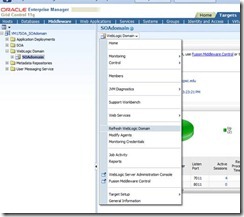

clip_image002

The following screen will appear, click on Continue.

clip_image004

After you click on continue target discovery will take place and a confirmation window will show how many targets were found:

clip_image006

After you click on close you’ll be brought to the assign agents screen. I’m not aware of any reason why you would want to reassign to a different agent, so I just continued by clicking on Add Targets.

clip_image008

Once you have made any changes, if necessary, above click on add targets to save the changes.

clip_image010

Automatically refreshing a Weblogic Domain


If your environment changes quite frequently you may want to enable an automatic refresh. To do this login to Grid Control, click on the Targets Table, Middleware section and select the domain you wish to make the change for.

clip_image012

Notice above that my domain was last refreshed Apr. 1st. Click on the timestamp next to WebLogic Domain Refreshed and the following window will appear:

clip_image014

After you click ok, a confirmation message will be displayed saying that it was successfully scheduled:

clip_image016

If you click on the timestamp above next to Weblogic Domain Refreshed again:

clip_image018

You can click on the job name and it will bring you to the Job Activity section of Grid Control. From here you can change the schedule of the refresh, etc.

clip_image020


Thats it, pretty simple.  I prefer to use the manual method because it provides a summary of the new or modified targets,  which you don't get by scheduling it automatically.    I haven't checked the Grid Control job logs tho to see if that information is included there.

Tuesday

Weblogic–Patching with the Smart Update utility

We currently use Grid Control 10g to monitor some of our environments.    Its running on a server that needs to be decommissioned so I decided to go ahead and install 11g and migrate the setup. 

Grid Control 11g requires Weblogic, which I have installed many times and while going through the install guide for Grid Control 11g I noticed that you need to apply patch ID WDJ7.
I’ve never patched a weblogic environment before (although its on my list to do since I need to apply security patches to some other environments).   My initial thought was “Oh great”, expecting it not to be a simple straightforward process or to encounter issues during the install.    My background is as an e-Business Suite DBA.  The EBS dba’s out there can certainly understand where I’m coming from.  (Although I have to say, even EBS has improved over the years.)

Anyways, long story short, I expected patching Weblogic to be complicated but I was pleasantly surprised to find that its very simple.  My environment is 64bit linux.  The first step is to launch the Smart Update utility by executing $BEA_HOME/utils/bsu/bsu.sh.

Note:  This is an X based application, so you’ll need to make sure your DISPLAY environment variable is set appropriately.  After you login with your Metalink account information, the first screen you’ll see is:

smartupdate1

Click on the Get Patches tab:

smartupdate2

As you can see above I selected the patch required WDJ7 as well as the latest CPU Advisory.     Once you click on the Download Selected button you’ll be presented with a few screens before the download actually happens.
  
Once the download has finished you’ll be brought back to the Smart Update utilities main screen.  

smartupdate_downloaded

Notice that even tho only two updates were selected to be downloaded, there are quite a few listed.  Click on the Manage Patches tab:

smartupdate_apply1

Click on the Apply button to the right of the patch you’d like to install.   Before you do that notice the icons next to the Patch ID and Description columns.    The Smart Update utility seems to break apart the patches to show the individual bugs addressed.    If you click on the apply button next to 4D53 for example, you’ll be prompted with:

conflict

So 4D53 is part of WDJ7 and could be applied separately if you wanted to.  Notice that the icon to the left of WDJ7 is layered which means it’s a patch set.   If you click on the apply button next to WDJ7,  all the patches included in the patch set will be applied at the same time.  In the case of WDJ7 that includes 4D53, NIXN and XLXA. 
 
I’ve tried removing just a single patch included with WDJ7 and reapplying it with no issues.   That’s pretty cool.  Potentially if you hit an issue with a particular patch breaking something you can easily remove it.

Once all the patches are applied:

smartupdate_after

That’s it.  

Saturday

FMW 11g – Upgrading Sun JDK

Recently I upgraded a Fusion Middleware Environment from 11.1.1.2 to 11.1.1.3.  As part of this, java had to be upgraded since the version I was on, 1.6.0_16 is not certified for 11.1.1.3.

I checked the Fusion documentation, WebLogic documentation and about the only thing I could find was:

Upgrading Sun JDK in the Oracle Home Directory

Basically it says to install the new JDK version in the same location as the existing JDK.  Well, that wouldn’t be a problem, other than in my infinite wisdom I installed it under the directory name jdk1.6.0_16.    Putting a new version, 1.6.0_22 in that directory could be confusing and not a best practice.  If I had my time back I would have named the directory jdk1.6 and this wouldn’t be an issue.

So how do I fix it?   I searched all the weblogic domain configuration files, startup scripts and console but could only find references to the JDK directory in two files.
  1. One reference in $WLS_HOME/common/bin/commEnv.sh

    JAVA_HOME="/var/u01/app/oracle/product/jdk1.6"

  2. Two references in $WEBLOGIC_DOMAIN_HOME/bin/setDomainEnv.sh

  3. SUN_JAVA_HOME="/var/u01/app/oracle/product/jdk1.6"             JAVA_HOME="/var/u01/app/oracle/product/jdk1.6"
    Note: If you have multiple weblogic domains you will need to change each domains setDomainEnv.sh file.
I bounced the domains and checked the start logs to verify that the new java home was being used.    For example, if I grep  the AdminServer log for my domain:

grep  jdk1.6 /u01/app/oracle/product/fmw11g/user_projects/domains/SOAdomain/servers/AdminServer/logs/AdminServer.log


now shows references to the new JDK home.  Some lines, but not all:

java.runtime.version = 1.6.0_22-b04
java.version = 1.6.0_22


You can grep it for your old version as well to make sure it isn’t being referenced.

I also opened an SR to make sure that there weren’t other files that should be modified.   Oracle Support didn’t say there were but did say that I could re-open the SR if I encountered any issues.  Not sure if thats a good thing or not.  ;)

Tuesday

TEMP Space issues while installing WebLogic?

Trying to install WebLogic today and I hit the following:

image

By default the installer extracts files to /tmp with a directory name in the format of bea<numbers|timestamp?>.tmp and uses 918M of space on Linux. 

Usually you can use the OS environment variable TMPDIR to specify another temporary directory but I guess since this is a java program its ignored.

Instead you have to pass a parameter to Java when you launch the installer.

$JAVA_HOME/bin/java -Djava.io.tmpdir=/var/tmp -jar wls1032_generic.jar